
|

Your research. Our software.
A perfect pairing.

What is StataNow™?
First and foremost, StataNow™ is Stata. It is a continuous-release version of Stata that offers new features as soon as they are ready. StataNow™ is the result of our ongoing effort to deliver the best Stata—the most current Stata—to our users.
StataNow™ provides access to new features as soon as they are certified ready by the development team. Those features are added to StataNow™ via free updates as soon as they are available. Thus, StataNow™ provides access to new features sooner. For instance, StataNow™ 19 contains features that will also be part of a future major release, Stata 20.
View StataNow™ features
The features in StataNow are fully tested, fully certified, well documented, version controlled (if needed), as well as polished to our customary high quality. These features are prioritized in the development cycle to be available as soon as they are ready so that users can take advantage of them right away. As always, all versions of Stata are updated regularly with any corrections and necessary improvements. You can view a list of all additions to Stata and StataNow since we shipped Stata 19.
The new features in StataNow are released continuously throughout the current release until the next major release. They are not released according to any preset schedule. All StataNow features are marked as such throughout the Stata website and the Stata documentation.
Because StataNow is Stata, when we mention "Stata" throughout our website and documentation, we also mean "StataNow". We will be specific about StataNow for features available only in StataNow. And because StataNow is Stata, it is available in all editions (StataNow/MP, StataNow/SE, and StataNow/BE) and on all supported platforms (Windows, Mac, and Linux). Throughout the website and documentation, we will usually refer to just Stata/MP, Stata/SE, and Stata/BE for simplicity. If you have a StataNow license as described below, you can take this to mean StataNow/MP, StataNow/SE, or StataNow/BE.
How can I get StataNow™?
All annual license holders have access to StataNow, regardless of whether you have an annual license or multiyear license or whether your institution has a site license. You can access the latest StataNow features by simply typing update all in the Command window or by asking your system administrator to update your Stata. Existing Stata 18 users may need to type update all twice. The first update will give you a Stata that knows how to update itself to StataNow. The second update will be StataNow. Then type help whatsnew to see the list of all features.
If you have a perpetual license with maintenance, contact us to obtain new download and license information for StataNow.
If you have a perpetual license without maintenance or your maintenance or license has expired and you want to get access to these great new features, contact us for your options.
How do I know if I already have StataNow™?
When you start Stata, you will see StataNow on the splash screen. You can also type about and you will see StataNow on the first line.
How do I continue receiving new features in StataNow™?
We are adding new features to StataNow continuously. To access these features, all you (or your system administrator) need to do is type update all in the Command window in StataNow. Then type help whatsnew to see the chronological list of all features.
New in Stata 19
- Machine learning via H2O: Ensemble decision trees
- Conditional average treatment effects (CATE)
- High-dimensional fixed effects (HDFE)
- Bayesian variable selection for linear model
- Interval-censored multiple-event Cox model
- Bayesian quantile regression
- Panel-data vector autoregressive (VAR) model
- Correlated random-effects (CRE) model
- Bayesian bootstrap
- Control-function linear and probit models
- SVAR models via instrumental variables
- Instrumental-variables local-projection IRFs
- Latent class model-comparison statistics
- Bayesian asymmetric Laplace model
- Inference robust to weak instruments
- Meta-analysis for correlations
- Mundlak specification test
- Do-file Editor: Autocompletion, templates, and more
- Graphics: Bar graph CIs, heat maps, and more
- Tables: Easier tabulations, exporting, and more
- Multiple datasets: Modify a set of frames
- Stata in French
Which Stata is right for me?

Whether you’re a student or a seasoned research professional, we have a package designed to suit your needs:
- Stata/MP: The fastest edition of Stata (for quad-core, dual-core, and multicore/multiprocessor computers) that can analyze the largest datasets
- Stata/SE: Standard edition; for larger datasets
- Stata/BE: Basic edition; for mid-sized datasets
Compare Features

Stata/MP is the fastest and largest edition of Stata.
Almost every computer can take advantage of the advanced multiprocessing capabilities of Stata/MP.
Speed
Stata/MP is faster — much faster.
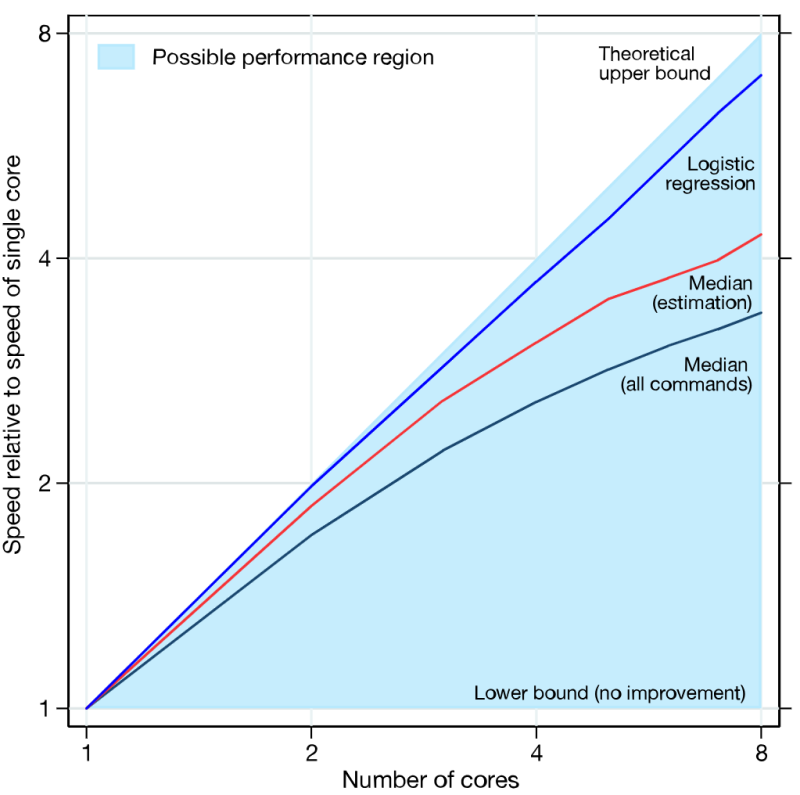
Stata/MP lets you analyze data in less time on inexpensive multicore laptops and desktops as well as on multiprocessor servers. Use just 2 cores, and your analyses run in one-half to two-thirds the time compared with Stata/SE. Use 4 cores, and cut the time to one-quarter to one-half. Use more for even faster analyses. Stata/MP supports up to 64 cores/processors.
Speed is often most crucial when performing computationally intense estimation procedures. A few of Stata's estimation procedures, including linear regression, are nearly perfectly parallelized, meaning they run twice as fast on two cores, four times as fast on four cores, eight times as fast on eight cores, and so on. Some estimation commands can be parallelized more than others. Taken at the median, estimation commands run 1.7 times faster on 2 cores, 2.6 times faster on 4 cores, and 3.4 times faster on 8 cores.
Speed can also be important when managing large datasets. Adding new variables is nearly 100 percent parallelized, and sorting is 61 percent parallelized.
Some procedures are not parallelized and some are inherently sequential, meaning they run the same speed in Stata/MP.
For a complete assessment of Stata/MP"s performance, including command-by-command statistics, see the Stata/MP Performance Report
Size
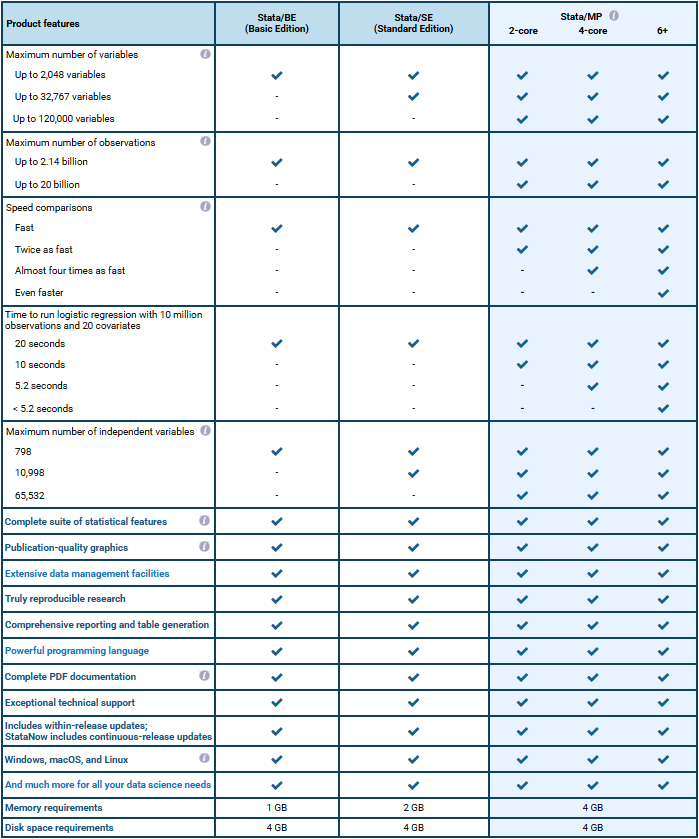
| Max. no. of variables | Max. no. of independent variables | Max. no. of observations | |
| Stata/MP | 120,000 | 65,532 | 20 billion* |
| Stata/SE | 32,767 | 10,998 | 2.14 billion |
| Stata/BE | 2,048 | 798 | 2.14 billion |
*The maximum number of observations is limited by the amount of available RAM on your system.
Because speed is most important when your problems are big, Stata/MP supports even larger datasets than Stata/SE.
Stata/SE can analyze up to 2 billion observations. Stata/MP can analyze 10 to 20 billion observations on the largest computers currently available and is ready to analyze up to 1 trillion observations once computer hardware catches up. Stata/MP also allows 120,000 variables compared to 32,767 variables allowed by Stata/SE.
What computer should I use to run Stata/MP?
Stata/MP licenses are not platform specific, and Stata/MP is available on all operating systems supported by Stata:
- Windows (64-bit x86-64)
- mac OS (Apple Silicon and 64-bit Intel)
- Linux (64-bit x86-64)
Compatible Operating Systems
Platforms
- Windows 11 *
- Windows 10 *
- Windows Server 2022, 2019, 2016, 2012R2 *
Stata for Mac®
- Mac with Apple Silicon or Intel processors
- macOS 11 (Big Sur) through macOS 26 (Tahoe) for Macs with Apple Silicon and macOS 10.13 (High Sierra) through macOS 26 (Tahoe) for Macs with Intel processors
- Any 64-bit (Core i3 equivalent or better) running Linux
- Minimum requirements include the GNU C library (glibc) 2.28 or better and libcurl4
- Check the output of ldd -v within a terminal
- For xstata, you need to have GTK 2.24 installed
Hardware Requirements
| Package | Memory | Disk space |
|---|---|---|
| Stata/MP | 4 GB | 4 GB |
| Stata/SE | 2 GB | 4 GB |
| Stata/BE | 1 GB | 4 GB |
Order Stata® Software
Purchase Stata for business, government, nonprofit, educational, or student use. New purchases, maintenance, upgrades, and renewals are available.
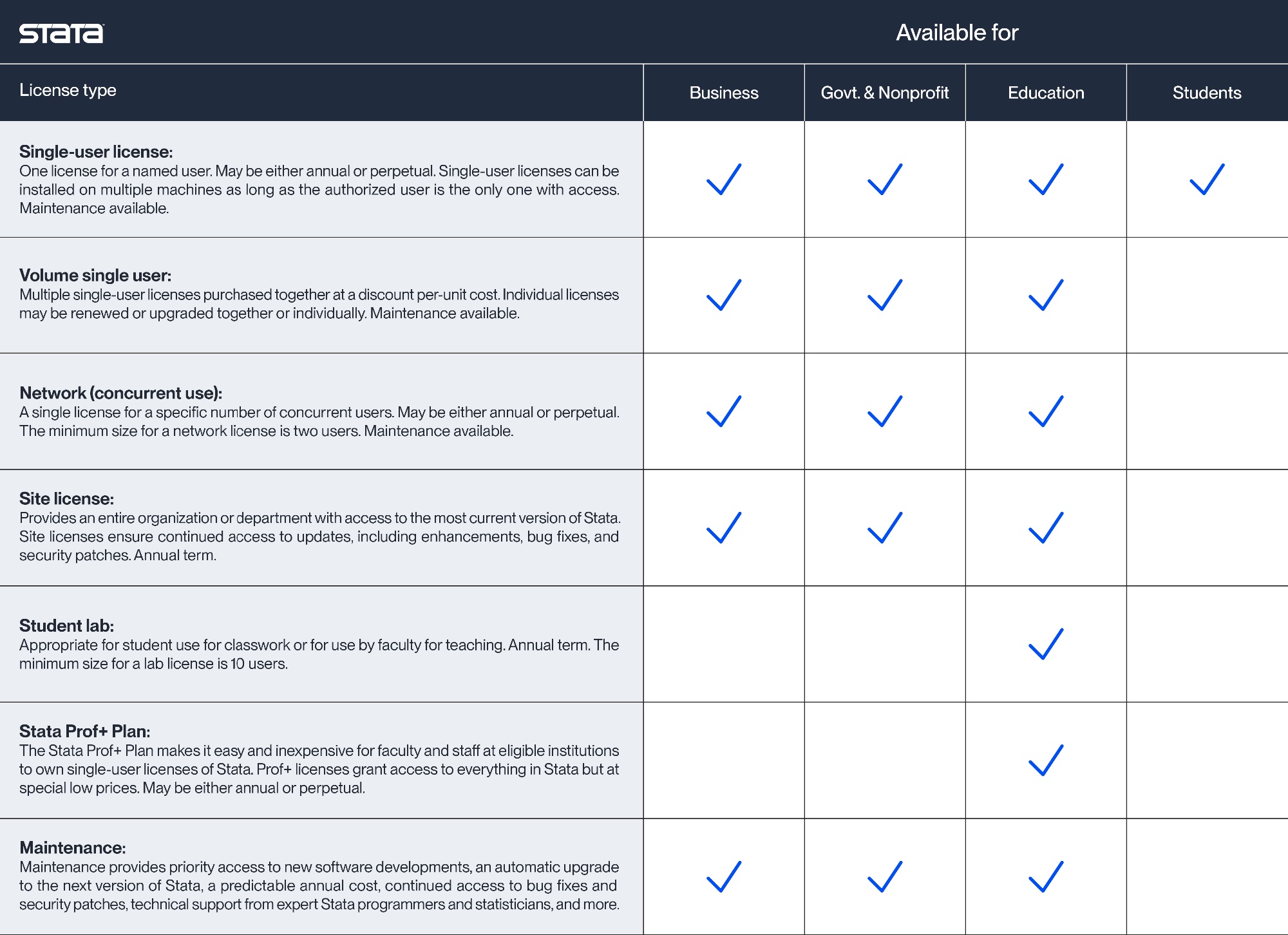
- Annual licenses
- An annual license is a license for StataNow
- An annual license offers our best prices and our easiest and most reliable way to keep a Stata license up-to-date and supported.
- An annual license is a one-year license. The term for an annual license begins the day we process your order. Prior to the one-year expiration date, customers may renew their license to ensure continued access to Stata software.
- An annual license allows users to receive updates and new releases to Stata software throughout the license term, all at no additional cost.
- An annual license lets users enjoy uninterrupted access to technical support from a dedicated staff of expert Stata programmers and statisticians.
- Perpetual licenses
- A perpetual license will not expire.
- Perpetual licenses include one year of maintenance.
Stata Press Books
Stata Journal
NetCourse
Evaluation License Request
Student Short Term License Request
Undergraduate Teaching License Request
StataCorp LLC